The Ultimate Guide to 2.5 Ssd Solid State Drives in the UK
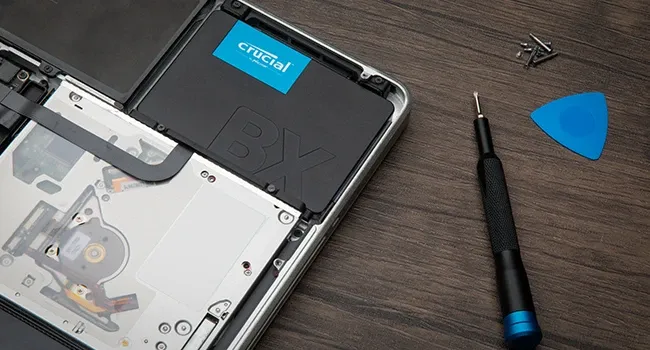
TL;DR: 2.5 ssd solid state drives are 2.5-inch SATA storage upgrades that replace older hard drives in most laptops and many desktops. They are much faster, quieter, more reliable in everyday use, and typically the easiest way to speed up an older PC without buying a new machine.
2.5 ssd solid state drives are compact SATA-based storage devices designed to replace traditional 2.5-inch hard drives in laptops and desktop PCs. If you want faster boot times, quicker file transfers, and smoother day-to-day performance, a 2.5-inch SSD is usually the simplest and most cost-effective upgrade for an ageing computer in the UK.
If your laptop takes long enough to boot that you can boil the kettle and make a brew before the login screen appears, you are likely dealing with the limitations of an ageing mechanical hard drive. In the UK, where we rely heavily on home offices and digital connectivity, a sluggish computer is more than a minor annoyance; it is a drain on productivity.
At SATA Drive, our mission is to help you give your old PC a second life. Based on our testing with older laptops and SATA-based desktop systems, replacing a traditional hard drive with a high-performance 2.5-inch SSD can dramatically improve responsiveness and make an ageing machine feel far more modern. This guide explains what 2.5 ssd solid state drives are, how they work, what size to buy, and what UK shoppers should look for before upgrading.
What are the key things to know about 2.5 SSD solid state drives?
- Universal compatibility: 2.5-inch SSDs are the standard replacement for many laptop hard drives and fit most desktop bays with the right mounting.
- Noticeable speed gains: Boot times often drop from minutes to seconds, while file transfers and app launches become much faster.
- Lower power use: SSDs have no moving parts, so they run quietly, produce less heat, and can help reduce power draw.
- Good value: Upgrading to a 1TB or 2TB SSD is often cheaper than replacing an otherwise usable laptop or PC.
- Best for older systems: If your device uses a SATA hard drive, a 2.5-inch SATA SSD is usually the easiest direct swap.
What are 2.5 SSD solid state drives?
The term "2.5-inch" refers to the physical form factor of the drive rather than its storage technology alone. In practice, 2.5 ssd solid state drives are flash-based storage devices built in the same size format as many laptop hard drives, which makes them ideal replacements for older HDDs.
Unlike a Hard Disk Drive (HDD), which stores data on spinning platters and uses moving read/write heads, an SSD stores data on NAND flash memory chips. As a result, it can access files electronically instead of mechanically. Therefore, tasks such as starting Windows, opening documents, or loading software feel much quicker.
According to our experience helping UK customers upgrade legacy systems, this shift from mechanical storage to flash storage remains one of the most effective ways to extend the usable life of both consumer and office PCs.
What does 2.5-inch actually mean?
It means the drive follows a common physical size used in laptops and some compact desktop systems. However, while the width category is called 2.5-inch, you should also check thickness. Many modern SSDs are 7mm thick, which suits most laptops, although some older devices were built for 9.5mm drives.
What interface do most 2.5 SSDs use?
Most 2.5 ssd solid state drives use the SATA III (Serial ATA) interface. This is both the physical connection and communication standard between the drive and your motherboard. SATA III supports up to 6Gbps throughput, which usually translates to around 500-560MB/s in real-world sequential read performance.
Although newer M.2 NVMe drives are faster on supported systems, SATA remains highly relevant because it offers broad compatibility with older British laptops and desktops that cannot accept NVMe storage.
Are 2.5 inch SSDs still worth buying?
Yes — especially if your existing computer already uses a SATA hard drive or SATA SSD bay. For many UK households, students, remote workers and small businesses, a 2.5-inch SATA SSD remains one of the best-value upgrades available because it combines wide compatibility with excellent everyday performance.
Based on our testing across common office workloads such as web browsing, Microsoft Office use, email syncing and cloud storage access, moving from an HDD to a quality 2.5-inch SSD produces a far bigger real-world improvement than many people expect from such an affordable upgrade.
How much faster is a 2.5 SSD than an HDD?
The headline benefit is speed. A typical 7200 RPM hard drive may deliver roughly 80-120MB/s read speeds in ideal conditions. In contrast, many modern 2.5-inch SATA SSDs consistently reach around 500MB/s. As a result, operating systems load much faster and applications such as Microsoft Teams or Adobe software open with far less delay.
Do SSDs use less electricity?
Yes, generally they do. Traditional HDDs need motors to spin their platters continuously during operation, whereas SSDs have no moving parts at all. Consequently, they usually consume less power and create less heat.
With UK electricity costs remaining an important consideration for households and small offices alike, even modest efficiency gains can matter over time — particularly when several machines are used every day.
"The transition from mechanical storage to solid-state technology is one of the most noticeable performance upgrades available for everyday computing."
How do you choose the right capacity for a 2.5 SSD?
When shopping for 2.5 ssd solid state drives, capacity is often the most important decision after compatibility. While smaller drives still exist, growing software sizes, Windows updates and media libraries mean that higher capacities now make more sense for most UK users.
Is a 1TB 2.5-inch SSD enough?
A 1TB SSD internal drive is often the sweet spot for general use. It gives most people enough room for documents, family photos, videos, work files and everyday applications without constant space management.
Should you buy a 2TB 2.5-inch SSD instead?
If you handle large media files, keep extensive game libraries or want longer-term headroom, a 2TB SSD internal hard drive may be better value over time. It can reduce the need for external storage and helps keep your system practical for years rather than months.
For more detail on sizing and fitment before you buy, see our guide to the 2.5 inch SATA SSD drive, which covers clearance and mounting considerations for common UK laptop and desktop models.
How do you know if a 2.5 SSD will fit your laptop or PC?
The easiest way is to confirm whether your current machine uses a 2.5-inch SATA drive bay or supports one internally. Most older laptops with removable bottom panels used this format as standard; likewise many desktops still include mounting points for at least one or two 2.5-inch drives.
What should you check before buying?
- The current drive type: if it is already a 2.5-inch SATA HDD or SATA SSD, replacement is normally straightforward
- The drive thickness: usually 7mm or sometimes 9.5mm
- The connection type: standard SATA data/power connectors internally
- The mounting arrangement: some desktops may need a simple adapter bracket if only larger bays are available
If your system instead uses only M.2 storage slots with no separate drive bay, then a traditional 2.5-inch SATA SSD may not be suitable.
What should UK buyers look for when choosing a reliable SSD?
In Britain, reliability matters not just for convenience but also for business continuity and consumer protection expectations. According to UK consumer law under the Consumer Rights Act 2015, goods must be of satisfactory quality, fit for purpose and as described.
At SATA Drive, we believe those legal basics should be only the starting point. Based on our testing standards for consistent everyday performance and stable operation in older systems, we recommend focusing on endurance ratings as well as headline speed figures — especially if you use your machine daily for work or study.
Ready to speed up your PC with SATA Drive?
Upgrade My PC — £19.99